
I'm Jorge, a software engineer based in Logroño, Spain. I work as a Tech Lead on banking projects, freelance for an international client and run several projects of my own in production.
For about a year now, generative AI agents have become a big part of my day-to-day work as an engineer. I still design the architecture, review the code and make the business decisions, and the agent mostly takes care of the repetitive work I used to do by hand.
The problem was that everything I explained to the agent ended up lost. It did not keep it from one session to the next.
I know there are several frameworks that solve part of this, and they gave me a starting point. But I wanted one that covered everything my freelance and personal projects need, so I built my own.
The first question was where to keep each project's context. I document a lot: code conventions, technical decisions, plans, business decisions written up as ADRs. And I wanted to be able to leave a task half done and pick it up another day with the whole process saved.
Keeping it next to the code did not convince me, because it filled the repositories with noise. I did not want to set up a RAG or a database either, with what they cost to pay for and maintain. And I wanted everything in the cloud.
Then something clicked.
A git repository is also a database.
If each project has a repository just for its documentation, next to the code repositories, the context is versioned and in the cloud, costs nothing extra and is easy to maintain and understand, for me and for any agent.
There was a second reason. Every project has its own rules: a specific
architecture, commits in English, code without comments, certain checks before
pushing anything. They were written in each repository's CLAUDE.md and still
got skipped, by agents and sometimes by people too, because nothing stopped
them. I needed something that blocked any action that did not follow the
procedure.
And working on several tasks at once brought two more problems. Two sessions on the same repository mixed their changes into the same commit, and two dev servers fought over the same port and the same database. And the agent called a job done without checking it: the tests passed, nobody had looked at the screen and the agent itself wrote in the commit that it was verified.
What crux is
Crux is the kernel my agents work with. It is installed once on the machine and all my projects depend on it. It sets the scope an agent moves in: where each project's information lives, which steps a task follows from start to finish and what has to be checked before anything is called done. The agent works inside that frame and cannot step out of it on its own.
It has three pieces for that:
- A standard that says how each project's documentation is organised.
- A set of skills, written procedures for recurring tasks.
- A command,
crux, that enforces the rules and does not let you continue if a step is missing.
I started it in August and named it crux, which in climbing is the key move of a route, the one that decides whether you get to the top. It works with Claude Code and Codex, six projects use it, it has 208 commits and it is on version 0.53.
Three layers
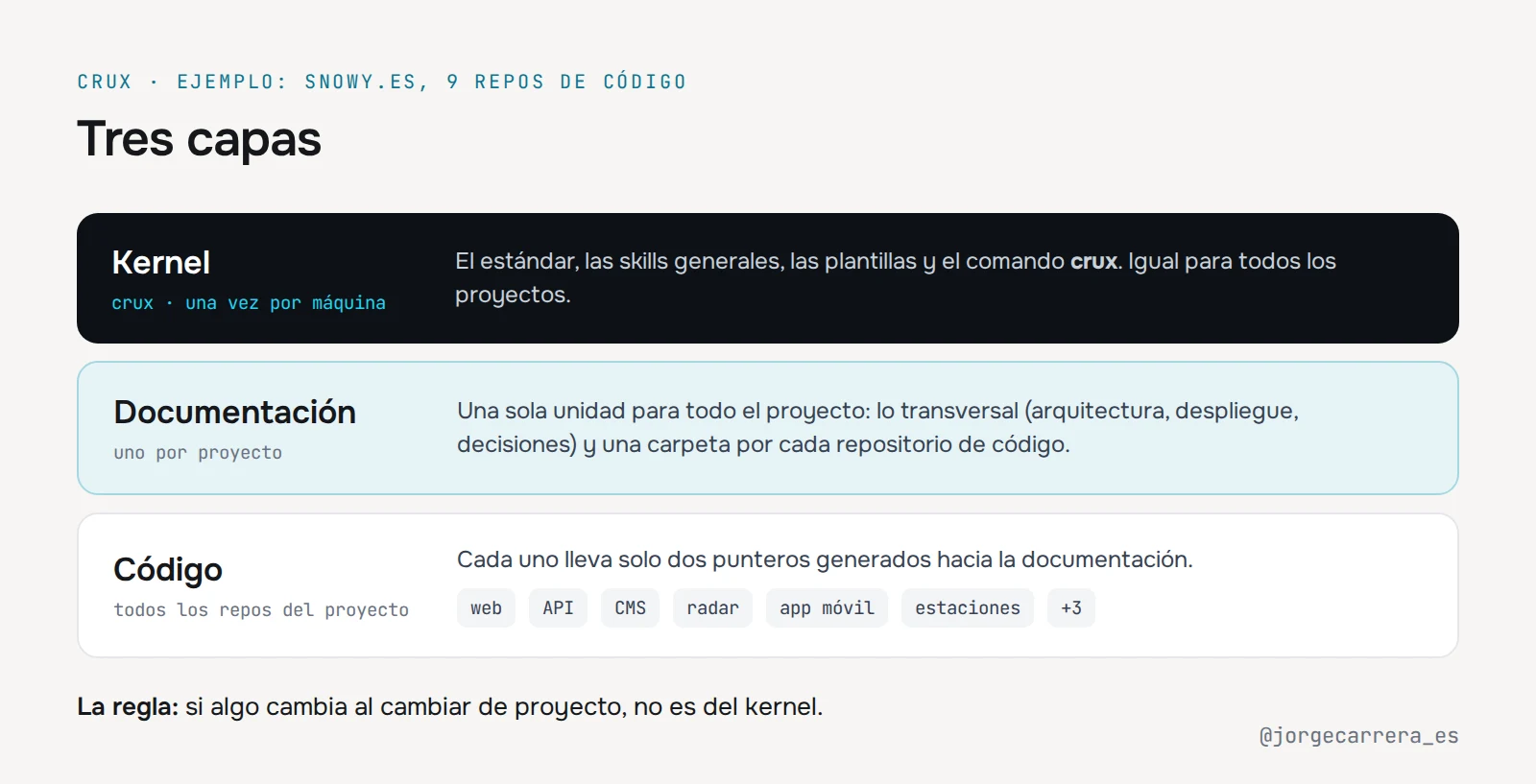
The kernel holds what is the same across all projects. Each project has its own
documentation repository: how it is deployed, what has been built, what was
decided and why. And each code repository only carries two short files,
AGENTS.md and CLAUDE.md, which crux generates and which point the agent to
that documentation. There is a single rule to decide where things go: if it
changes when you switch projects, it does not belong in the kernel.
One documentation repository groups all the code repositories of a project. In
Snowy, the weather platform I work on, there are nine: the
website, the API, the CMS, the radar generator, the mobile app, the WordPress
plugin and the jobs that collect data from weather station networks. It would
make no sense to maintain nine documentation repositories. They all hang from
one, snowy-docs, which works as a single logical unit. Inside, each code
repository has its own folder for what is only its own, and next to them sits
what cuts across: the architecture that ties them together, how they are
deployed and the decisions that affect several at once.
I do the same with my personal brand. Its documentation repository groups the website, the blog and the tools for my X account, and each new project that comes out of it goes in as one more folder.
Each project declares its configuration in a file, crux.json: which
repositories it has, what is checked before a commit and how it is deployed.
Principles
Two ground rules follow from that:
- An inventory of what already exists. Each project keeps one, covering what users see, and the agent reads it before proposing anything so it does not build again what is already there.
- Code and documentation in the same turn. If I change the code and not the documentation, the next agent works with outdated information.
The life of a task
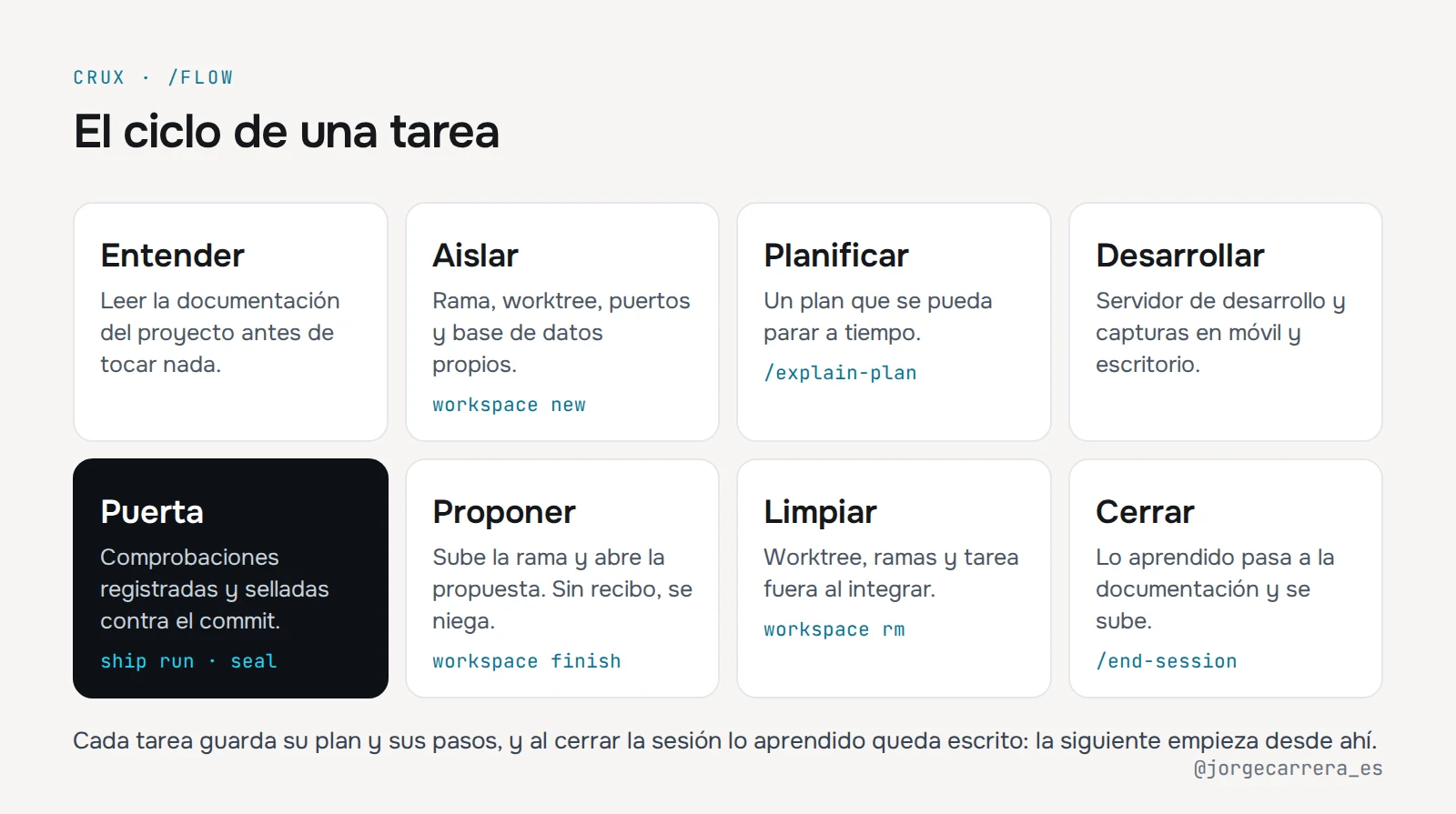
Every task follows the same path, small ones included.
Understand. Read the project's documentation before touching anything.
Isolate. crux workspace new creates its own branch and worktree, reserves a
port range and separates the database and the environment file. That way I can
have three tasks on the same repository in parallel without them clashing.
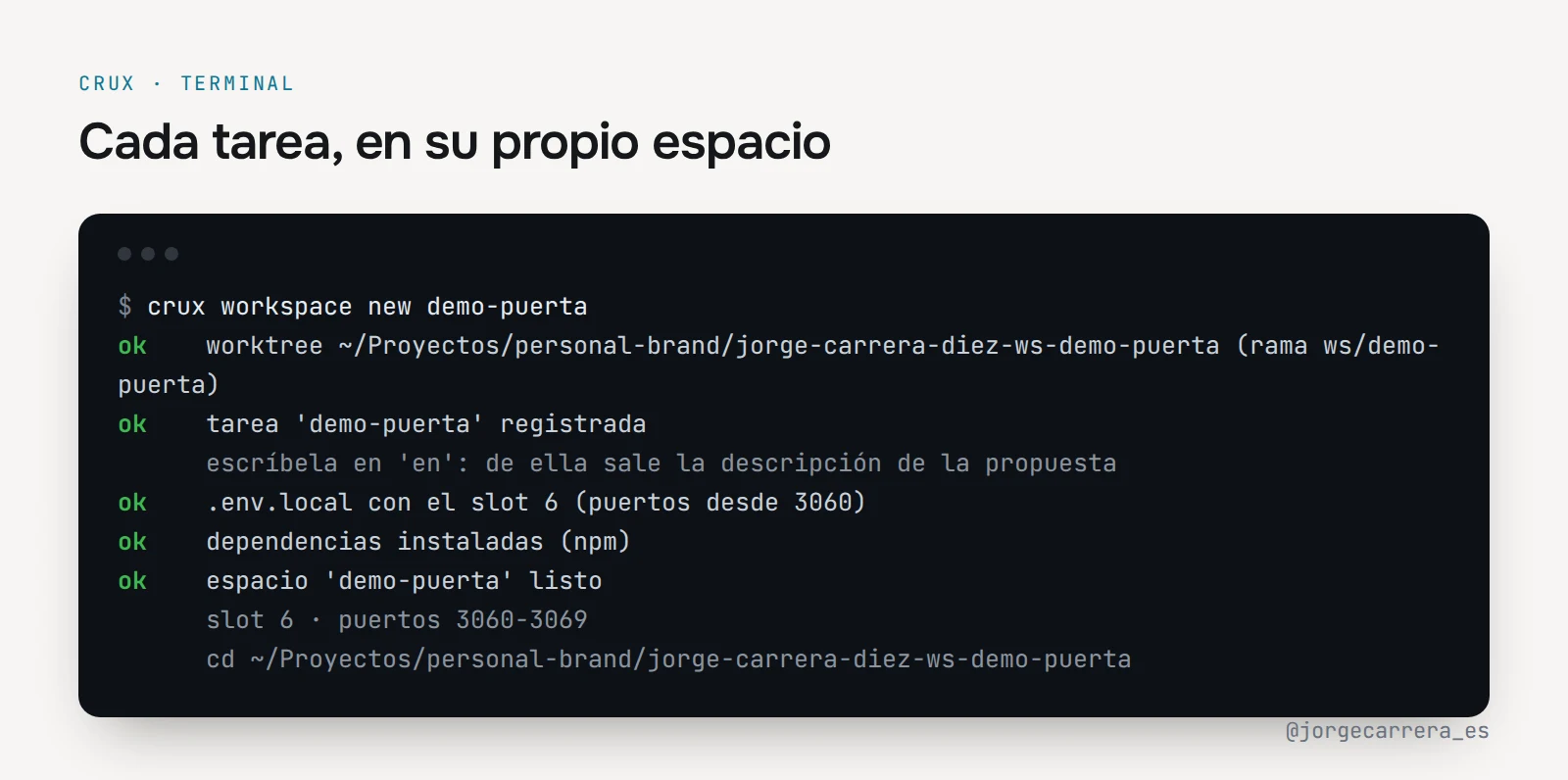
Each task also has a log with its plan and the steps taken. If I leave it half done, the next session picks it up from there.
Plan. If the task touches more than one module, the agent shows me a plan before writing code, with what it checked and what breaks if it is wrong, so I can stop it in time.
Build and pass the gate. The agent works on the dev server, with screenshots on mobile and desktop, and then goes through the quality gate, which I explain below.
Propose. crux workspace finish pushes the branch and opens the change
proposal.
Clean up. Once merged, the worktree, the local branch, the remote branch and the task are deleted, without me having to ask.
Close the session. Before finishing, the agent goes over the conversation and moves into the documentation what deserves to stay: decisions that do not show in the code, what is worth knowing to avoid tripping again and new rules. What it learned about me goes into its memory. Then it checks that nothing has been left outdated and pushes everything. So the next session starts knowing what was done in this one.
The quality gate
Before a commit there is a chain of checks: tests, lint, types, build, diff review, conventions, affected documentation. At first I ran all nine steps on every change, even a typo, and because it was so costly I ended up skipping them.
Now a script classifies the diff and decides which checks apply. A documentation change goes through three. One that touches the interface goes through all of them, visual review included. The script decides because, by eye, any change looks small and you end up skipping exactly the check that was needed.
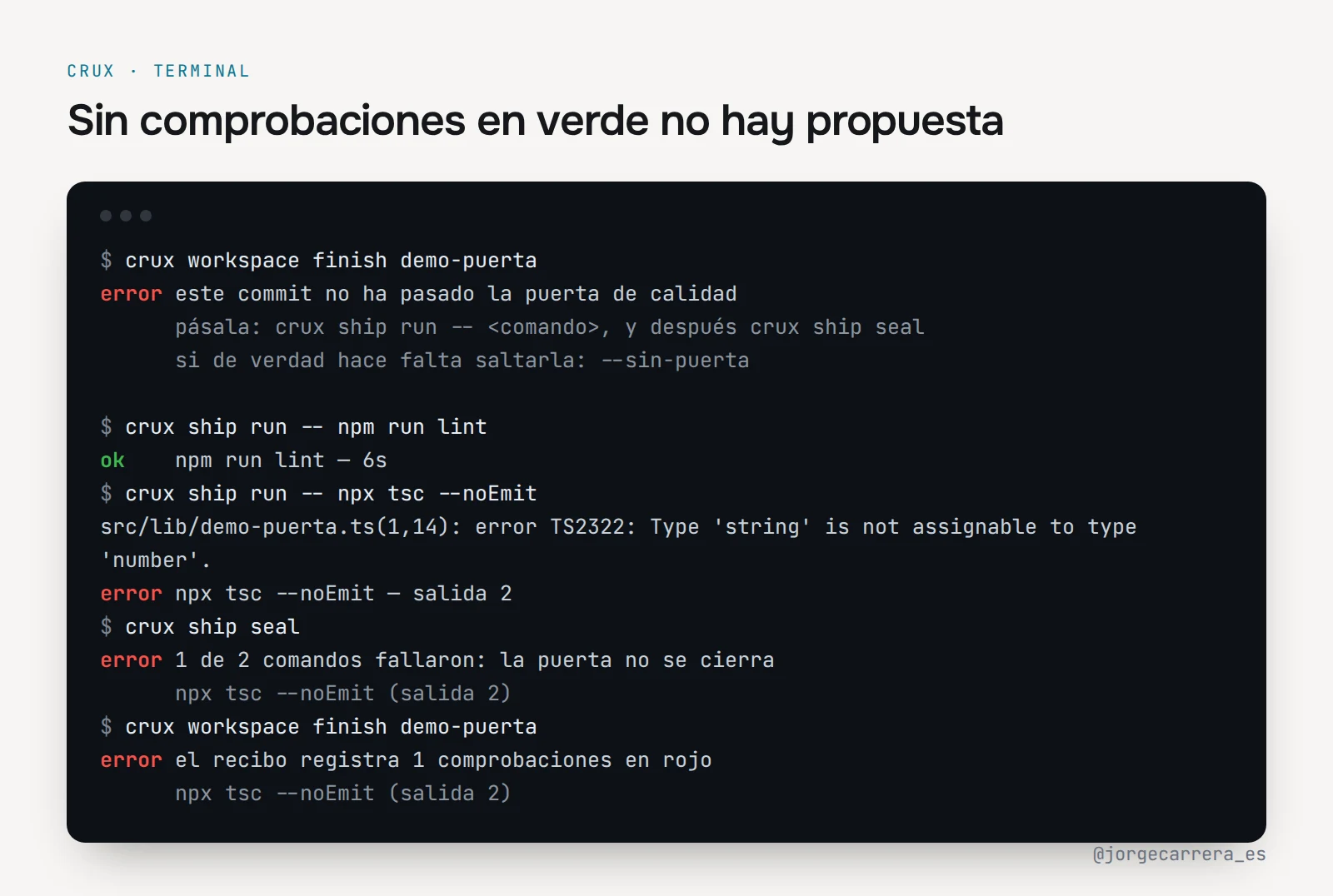
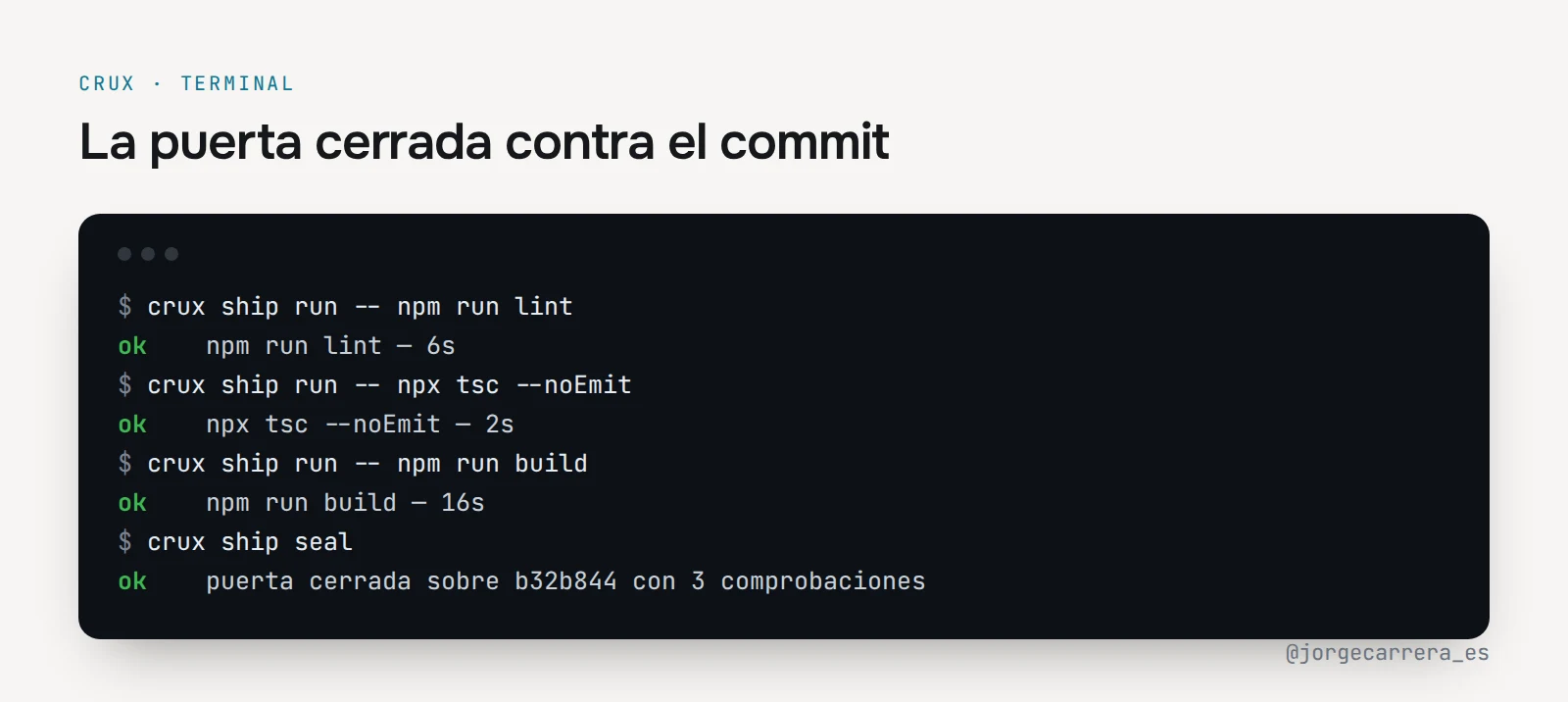
How it is recorded changed too. The agent used to write the commit hash into a
file after saying it had verified, and I had no way of knowing whether it
really had. Now every check runs through crux ship run, which records the
real result. crux ship seal closes the receipt against the current commit.
And crux workspace finish refuses to open the proposal if there is no
receipt, if something came out red or if the commit is no longer the same.
Each project's rules stop being a suggestion as well. Every crux.json declares
its own, and the gate rejects a change that breaks them. There are git hooks
too:
- One blocks pushing straight to the main branch.
- Another rejects a commit whose message is not in the project's language.
The gate can only be skipped with an explicit option, and only when I ask for it.
Visual changes have one more step, because tests do not see how the page looks. Before pushing, the agent shows me the before and after on mobile and desktop, and I approve what I see.
How to write skills that get used
I have 44 in the kernel, and each project has its own on top.
The agent does not read every skill before starting, because they would not fit. It only sees a short description of each one and decides from it which to open. If the description only says what the skill does, the agent does not link it to the task in front of it. That is why each description says in which situations it is needed and with which words the problem usually shows up, which is exactly what the agent compares.
Also, an agent is a poor judge of its own work. If I ask it to check whether a text sounds AI-written, it usually passes it, because it does not see its own tics. So when something can be measured, the skill ships a script that measures it and the agent only has to run it. The writing review counts the typical turns of generated text, and the quality gate classifies the diff to decide what needs checking.
You also have to decide where each skill lives. Some work for any project, like debugging an error or writing tests. Others only make sense in one, like deploying Snowy to its server. To tell them apart I cover the proper names: if the procedure still makes sense without them, it is general and goes to the kernel. The concrete data, like paths or the server, stay in a small adapter inside the project.
Finally, crux usage counts how many times each skill is used. If one is not
opened in a month, either the description is badly written or the skill is not
needed, and I fix it or remove it.
What comes next
Crux keeps growing almost every week, usually because of something I miss while working.
If I see that more people are interested and it can help them, I will consider opening it up. I am sure that, between several of us, it would end up quite a bit better than what I can get it to on my own.
In the meantime, let's keep reading each other here and on X, where I am @jorgecarrera_es. If you work with agents or are building something similar, I would love to hear how you do it.