Module 4 · Lesson 13
Orchestrating a team
Run several Bots through one coordinator, keep shared rules in a playbook one Bot owns, and onboard new Bots through the ones you already have.
Contents3
- Set up a coordinator Bot that assigns work and spots blockers instead of doing the work itself
- Keep team-wide rules in one playbook owned by one Bot, instead of copying them into every Bot
- Onboard a new Bot through an existing one, and ask a Bot to create a Bot
Eight Bots with you in the middle
With three or four Bot An AI teammate with a name, a job and its own conversation. It works on a computer in the cloud, even when you're away. See in the glossary →, you can still message each one yourself. By the time you have eight, you spend your day passing updates between them. Nobody knows who is stuck, and you become the busiest person on your own team.
The second problem shows up when you change how the team works. You decide that every result needs a screenshot. You paste that rule into one Bot, then another, and forget the third. A week later the Bots disagree about the rules.
This lesson solves both problems with two roles. One Bot coordinates, and another Bot keeps the written rules.
A coordinator and a playbook
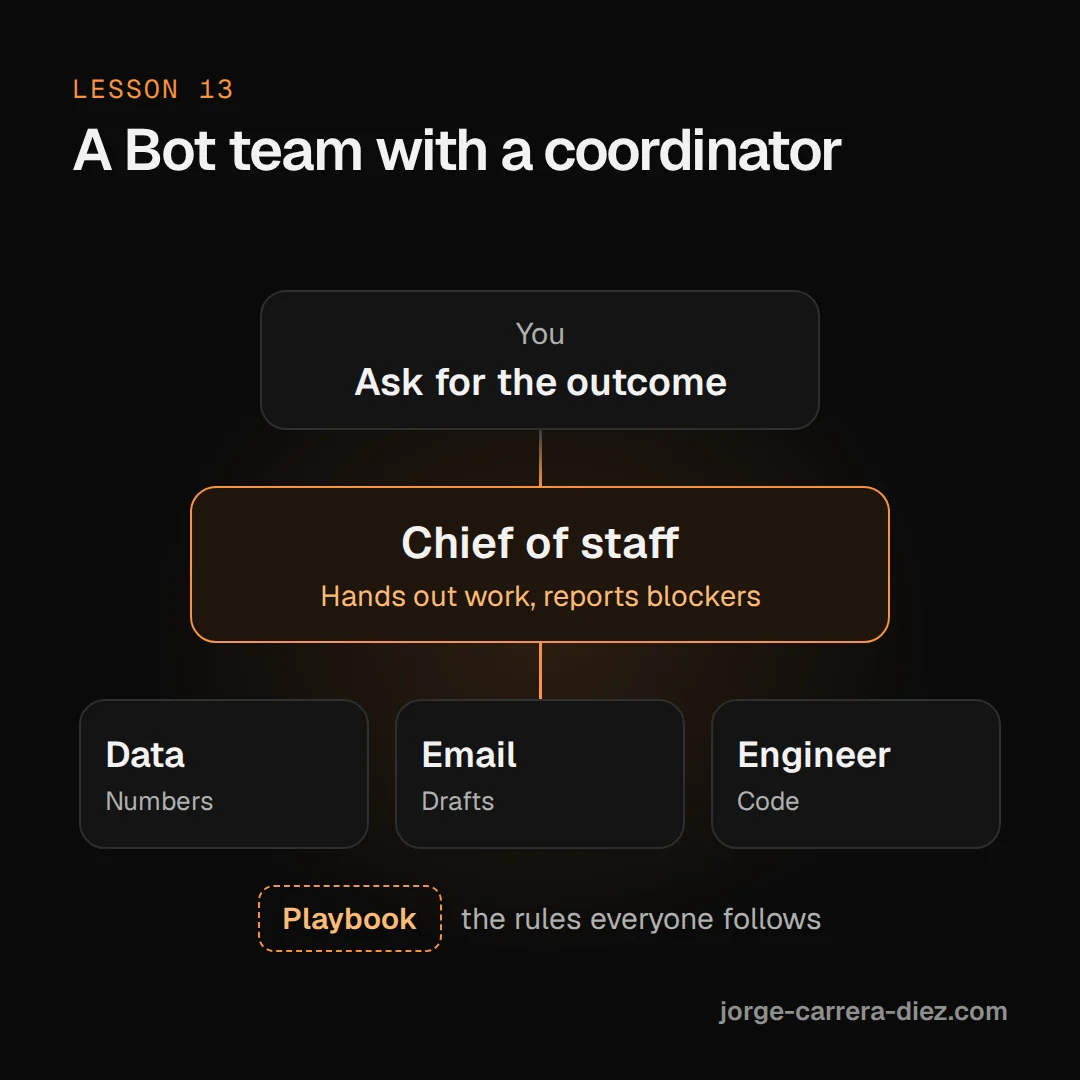
Think of a small office. One person runs the week. They hand out work, chase updates and flag anything that is stuck. Another person keeps the team handbook, which every new hire reads on day one. A team of Bots can work the same way.
The coordinator
The official docs recommend starting small (lesson 11). Give one Bot ownership of an end-to-end outcome, and add another only when the work has a stable specialist role. In a group, "the coordinator can assign work, while the group preserves the handoffs in one conversation" (Create and manage Bots).
A coordinator is often called a Chief of staff A coordinator Bot: it hands work to the other Bots and only reports blockers and decisions to you. See in the glossary →. It has three duties:
- It takes your requests and passes each one to the right specialist.
- It collects status from the team and tells you only what needs your attention.
- It spots blockers, the things stopping work, and sends each one to the Bot that can clear it.
It should not do the specialists' work. Put that rule in its description, where rules that must always hold belong (lesson 03).
Keep one owner at each stage, as in lesson 12. Too many handoffs running in parallel create duplicate work and noisy updates.
Day 1 · 4:16:08A chief of staff routing work to engineering Bots
The playbook and its owner
Each Bot's memory belongs to that Bot (lesson 05). So a rule you teach one Bot does not reach the others. You have two ways to share it:
- A skill, for a method. Skill Saved instructions to do a task the same way every time. All your Bots can use them. See in the glossary → are available across your Bots (lesson 06).
- A playbook, for team rules and workflows. It is a document kept where your team already keeps information, such as a Notion page or a file in the shared
/workspacefolder (lesson 09). The docs advise keeping facts that change in that kind of source, not in a Bot's memory.
The xAI team added one habit on top: one Bot owns the playbook. When you agree a new workflow with any Bot, that Bot sends it to the owner. The owner updates the document and announces the change to the rest of the team. You say it once. There is no special setting for this. You build it from a description, a document and ordinary messages between Bots.
Day 1 · 4:29:46The playbook owner announces a new workflow to all Bots
Onboarding and Bots that create Bots
A new Bot starts empty. Instead of pasting your instructions into it, ask a Bot that already knows them to brief it. The new Bot keeps the briefing in its own memory.
A Bot can also create Bots. The docs say your existing Bots "can also suggest or create a focused Bot when a job should have a long-lived owner". They suggest asking your Bots to check with you before creating several, so the roster stays small.
Set up the coordinator and the team manual
Create the coordinator. Choose New, then Create new agent in New chat. Open Bot actions → Edit Profile and give it a name and a description like this:
PromptYou are the team's chief of staff. You own the weekly launch plan, not the tasks inside it. Your team: Researcher, Writer, Analyst. Always delegate work to the right teammate. Collect status, flag blockers, and tell me only what needs a decision from me. Never send anything outside the company without my approval.Give it a rhythm. Ask it to create a Routine Work a Bot does on its own, on a schedule or when something happens in another tool. See in the glossary → (lesson 10) that checks in with the team and stays quiet when nothing needs you:
PromptEvery weekday at 10:00 and 15:00, ask each teammate for status. Post one short list of blockers and decisions I owe. If there are none, don't post anything.Pick the playbook owner. Choose an existing Bot or create an Operations Bot. Put its job in the description: "You own the team Playbook The Bot team's manual: the rules they all follow, in a shared document. See in the glossary → at [link]. Add workflows other Bots send you, then announce each change to every Bot on the team."
Route new rules through the owner. When you agree a rule with any Bot, finish with: "Send this to Operations for the playbook."
Onboard new Bots through the team. When you add a Bot, ask the coordinator or the playbook owner to brief it. Then ask the new Bot to tell you what it saved.
Talk mostly to the coordinator. Go straight to a specialist only when you need that Bot.
A new Bot learns the rules from another
In the livestream's engineering workshop, the presenter ran a chief of staff and several engineering Bots. They installed a new Bot, a nightly audit engineer. It didn't know how the team worked, and the presenter didn't brief it directly. They sent this to their existing engineering Bot:
Hello. I have a new member in the team called nightly. Rename them to Steve and tell them how the engineering workflows are enforced.The engineering Bot sent Steve the requirements. They covered how the Notion task board is organized, what "clean" means, the phases of the workflow and the lint rules (automatic checks on how code is written). Steve saved them to memory, and the two Bots confirmed with each other.
Day 1 · 4:18:13Onboarding a new Bot through an existing one
A few minutes later, the presenter agreed a workflow for urgent bugs with the same engineering Bot. They asked it to hand the workflow to Jenny, the operations Bot that owns the playbook in Notion. Jenny added it and announced it to every engineering Bot as a standing rule. Lesson 17 covers that workflow.
Earlier the same day, another presenter used Dr. Eggbot, a Bot that creates Bots, installed from the marketplace. They had it turn their default Bot into a chief of staff and add a prototyping Bot with a food-themed name. Dr. Eggbot isn't in the official docs, so you may not find it. You can get the same result by asking one of your own Bots to propose a new Bot.
Day 1 · 2:05:40A Bot that creates Bots sets up a chief of staff
Day 2 · 7:14:04One rule for every Bot at once
A coordinator that works instead of coordinating
- The coordinator does the work itself. It fills its context with specialist detail and stops coordinating. Fix: write "always delegate to your team" in its description.
- Copying the same rule into every Bot. The copies drift apart and you can't tell which is current. Fix: keep one playbook with one owner, and send changes through the owner.
- Asking several Bots to handle the same step. You get duplicate work and noisy updates. Fix: name one owner for each stage.
- Putting the whole team in a group chat for everything. Every Bot answers, which is noisy and expensive (lesson 12). Fix: use a group only when the handoff itself needs to be visible.
- Deleting a Bot the coordinator still delegates to. The coordinator isn't told about the deletion and keeps trying to send it work. Fix: tell the coordinator to stop using that Bot, and update the playbook.
- Letting a Bot create Bots freely. The roster grows faster than you can review it. Fix: ask it to propose new Bots and wait for your yes.
A team that organises itself
- One coordinator owns the outcome, delegates, and reports only blockers and decisions.
- Keep team rules in one playbook, in a document outside any Bot's memory, owned by one Bot that announces changes.
- Brief new Bots through Bots that already know the job, and check what they saved.
- Your Bots can create focused Bots. Ask them to propose first.
- One owner per stage keeps handoffs clean.