Module 8 · Lesson 24
Sales and prospecting
Bots that update the CRM after every call, write in your voice from the emails that worked and split research on hundreds of accounts.
Contents3
- Teach a Bot to write like you from the emails that got replies
- Build a prospecting team that is created and coordinated from a single Bot
- Split research on many accounts across Bots in parallel without losing control
Hours not spent selling
In the afternoon the studio asked their intern what makes a game go viral. He said word of mouth and posting constantly, and that X is where early adopters are. For Ship by Thursday, getting players was its way of selling. The sales and prospecting workshops showed how that work is done at scale with Bot An AI teammate with a name, a job and its own conversation. It works on a computer in the cloud, even when you're away. See in the glossary →.
A salesperson spends a good part of the week on work that isn't talking to customers. They have to find who to write to, read what each company last published, draft emails and log in the CRM The tool where a team tracks customers and sales deals. See in the glossary → what was said on each call. A CRM is the tool where the team tracks customers and deals. In a rush, emails end up looking like a template with the name swapped, and the CRM goes out of date.
Lesson 19 showed founder Bots that prepare calls in read-only mode. This lesson goes a step further, with Bots that carry the daily work of sales and prospecting.
A Bot that does, not one that advises
A salesperson in the workshop described her first mistake with Grok Bot. She asked it to research a customer, and the Bot sent back links to webinars for her to watch. She told it to watch them itself and draft the email. A Bot has its own computer and works while you sleep, so you can hand it the whole job, not just the search.
Your voice, taken from what worked
Connecting your email isn't enough for a Bot to write like you. The SDR in the workshop, the person who finds new customers, filtered further. He told the Bot to read only emails sent to companies in his accounts, keep the ones that got a positive reply and give more weight to recent ones. On his team, what worked three months ago doesn't work today. Then he reviewed drafts one by one and criticised them until they stopped looking like templates.
The CRM updates itself
After each call, a Bot reads the meeting transcript and writes the next steps into the CRM in a fixed format: initials, date, what the customer wants and next steps. The salesperson reviews it and pushes it. Another Bot with access to the code answers technical questions during the call, with text ready to paste, without bringing in an engineer.
One Bot to talk to
In the prospecting workshop, the whole team was created through the Chief of staff A coordinator Bot: it hands work to the other Bots and only reports blockers and decisions to you. See in the glossary → Bot. That way this Bot knows what each one is for and who to hand each job to. There was one for writing emails, one for web search, one that summarises why similar deals were won and another for the inbox. The SDR only talks to the chief of staff.
The salesperson from the other workshop does the opposite. She talks to each specialist directly, because she says it uses less. Both approaches work. If you're unsure, describe your work to a Bot and ask it to suggest how to split it.
An army for hundreds of accounts
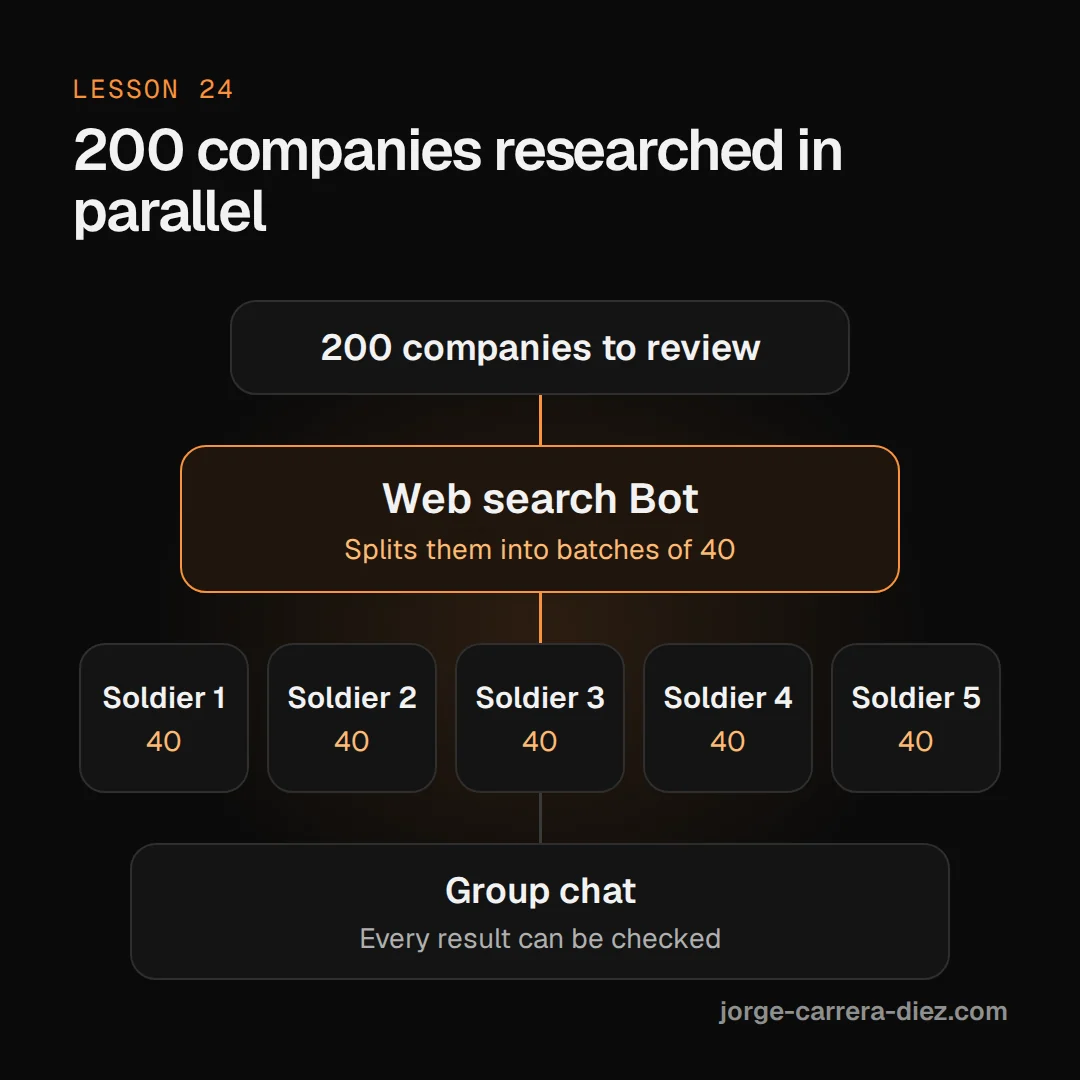
Reviewing 200 companies a day doesn't fit in one conversation. The web search Bot has an "army" of soldier Bots in a group chat. It splits the companies into batches of 40, each soldier researches its batch with little context and the results come back to the group, where each one can be checked. To research more accounts, you add soldiers.
Build prospecting on your own emails
- Create the chief of staff first and create the other Bots through it.
- Connect email and the CRM from Settings → Plugins.
- Teach it your voice with a filter. Emails to customers in your accounts, with positive replies, with more weight on recent ones. Save the resulting guide as a Skill Saved instructions to do a task the same way every time. All your Bots can use them. See in the glossary → (lesson 06).
- Review and criticise ten drafts. Say why each one doesn't work until none looks like a template.
- Automate the CRM update after each call, left for review before it's pushed.
- Schedule daily prospecting as a Routine Work a Bot does on its own, on a schedule or when something happens in another tool. See in the glossary →: a prioritised list and drafts in your email, sending nothing.
- Add an event-based routine. When an account moves to a new stage in the CRM, its contacts come out of the sequence so you stop emailing them.
A prospector's morning with Bots
Day 2 · 6:15:54Fifty prioritised prospects every morning
Every morning, a routine leaves 50 new prospects in priority order. The top five need attention now. The chief of staff checks the calendar and books time: a 15-minute block at 9 for those five and an hour at 1 for the rest. The drafts wait in Gmail and, if he wants, the SDR asks the Bot for a confidence score on each email.
Call context changes the messages. If the account executive spoke to a company yesterday and the customer complained about having too many tools, today's emails to that company take it into account. If someone on the call said "talk to Simon on the AI team", the Bot adds him to the sequence instead of leaving it forgotten in a transcript.
A request to start with:
Read the emails I've sent in the last six months to companies in my CRM accounts. Keep the ones that got a positive reply and give more weight to the last few weeks. Write a short guide to how I write in those emails: opening, length, tone and how I ask for the meeting. Save it as a skill called "Prospecting emails". Don't send anything.Day 2 · 6:14:53The soldier army researches in parallel
Sales team mistakes
- Emails that only change the name. The customer spots the template and doesn't reply. Fix: ask for examples, criticise each one and require that none looks like another.
- Asking the Bot for links instead of work. You're still the one watching the webinars. Fix: ask it to watch them and hand you the draft.
- Creating a new Bot for every idea. The team gets chaotic and usage climbs. Fix: before creating another, ask why an existing Bot or a routine can't do it.
- Routines every few minutes. Noise and spend with no result. Fix: one or two a day, or a routine that fires on a CRM event.
- Sending unreviewed while you train the voice. A bad email reaches a customer. Fix: drafts until you trust them, and still review the important ones.
Selling with Bots, in short
- Give the Bot the whole job: watching the webinar and writing the email, not passing you the link.
- Your voice comes from the emails that worked, weighted towards recent ones, and from many corrections.
- Create the team through a coordinator Bot so it knows who to hand each job to.
- Split big research across an army of Bots in a group where you can check each result.
- Sends stay behind your approval.